

I like weather apps that respect my attention, and My Moon Phase - Lunar Calendar takes that idea in a very specific direction. Instead of trying to replace a full forecast service, it focuses on the Moon, lunar timing, and the light conditions that make an evening outdoors feel different. I found it most useful when I wanted to plan around the night sky rather than check rain, wind, or temperature.
That narrow purpose is also the key to understanding the app. It is a free weather app from JRustonApps B.V., available to everyone and designed for people who want a quick view of lunar information. It has built a strong audience, with a 4.8 average from around 43 thousand ratings and more than a million installs. Those figures suggest that the focused approach works for many users, but they do not change the central trade-off: this is a companion to a conventional weather app, not a replacement for one.
How the app feels in everyday use
A focused view instead of an overloaded forecast
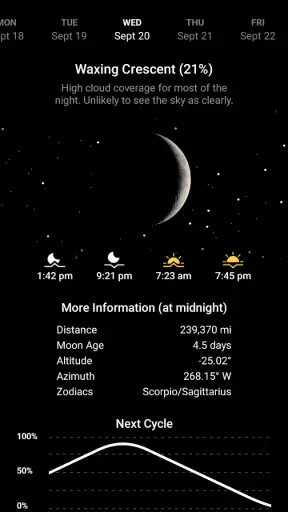
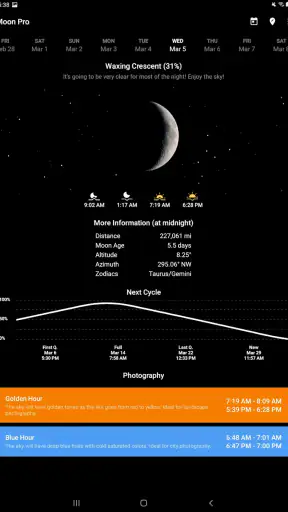
My first impression was that the app makes sense when I stop expecting it to behave like a standard weather dashboard. Most weather apps lead with hourly temperatures, precipitation charts, radar maps, and warnings. This one puts the lunar calendar at the center, with the current Moon phase and related timing treated as the information I came to see.
That focus is valuable because lunar information is often buried inside broader astronomy or weather tools. If I only want to know whether the Moon is waxing, when the next full Moon is approaching, or whether the evening will have a useful period of golden hour, a large forecast app can feel unnecessarily busy. Here, the subject is clear from the moment I open it.
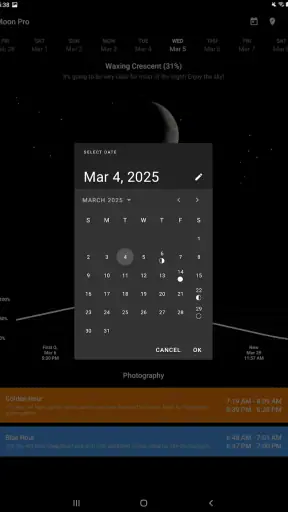
The app is especially easy to understand for casual users. I do not need to know astronomy terminology before using it. The visual presentation gives the lunar cycle a practical context, while the calendar view helps me think beyond the current night. I can use it for curiosity, photography planning, an outdoor walk, or simply to understand why the Moon looks different from one week to the next.
Useful for planning, not just checking
The strongest part of the experience is the shift from a single current condition to a planning habit. A weather app usually answers, “What is happening today?” A lunar calendar answers a different question: “What will the night look like when I want to go outside?” That distinction makes this app more useful than its short description might suggest.
For example, imagine I am arranging an evening landscape photography session. I would still use a normal forecast app to check cloud cover and wind, but I could use this app first to identify nights with a promising Moon phase and golden-hour timing. That two-app workflow is more realistic than expecting one tool to do everything. The lunar app handles the calendar logic; the forecast app handles changing atmospheric conditions.
I also found the calendar more useful for planning ahead than repeatedly opening a daily forecast. If I am choosing between several dates for a walk, a camping trip, or an outdoor gathering, lunar information can help me understand how bright or visually distinctive the night may be. It does not make the decision on its own, but it adds a layer that ordinary weather apps often overlook.
What the main tools are good at
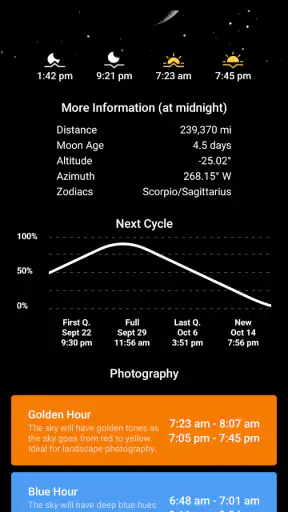
The core experience revolves around three connected ideas: the lunar calendar, full Moon timing, and golden hour. Each serves a different type of user. The lunar calendar is the broadest tool, because it gives structure to the changing phases. Full Moon information is more event-oriented, while golden hour is immediately practical for photographers and people who care about warm natural light.
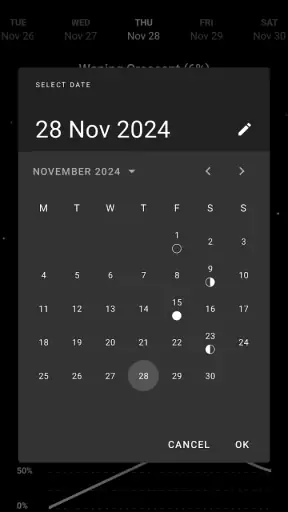
I appreciate that these elements belong together. Moon phases can feel abstract when viewed as isolated symbols, but placing them in a calendar makes the cycle easier to follow. Golden hour adds a daily outdoor reference point, so the app is not limited to people who actively study the Moon. Someone planning a portrait session or a scenic walk may find that part more useful than the lunar details.
A small but important tip is to use the app before making plans, not only when you are already outside. The value comes from comparing dates and noticing how the lunar cycle fits your schedule. Opening it at the last minute is still helpful, but the calendar becomes much more meaningful when it guides a choice between several possible evenings.
How it compares with regular weather apps
Compared with a typical weather app, this one is calmer and more specialized. A normal weather application is better for decisions involving safety or comfort: whether to carry an umbrella, how cold the morning will be, or whether strong wind could disrupt a trip. It usually offers more environmental context and more frequent forecast details.
My Moon Phase - Lunar Calendar is better when the Moon itself is the reason I am checking my phone. Its advantage is not breadth but clarity. I do not have to search through a forecast screen to locate lunar information, and the calendar perspective encourages longer-term planning. For a user who already has a favorite weather service, installing this as a companion makes more sense than switching away from that service.
It also differs from dedicated astronomy applications. A specialist astronomy tool may be preferable for someone who wants a broad sky map, detailed object tracking, or a deeper educational experience. This app feels more approachable because it keeps the focus on lunar phases and related timing. That simplicity is a strength for everyday use, although advanced sky observers may eventually want a more comprehensive instrument.
What the current version means for users
A mature app with a long development history
The app was released on June 19, 2016, and the current version is 26.5.1. That combination tells me I am looking at a mature product rather than a newly launched experiment. A long-running app has had time to settle into its main purpose, and the current version indicates that development has continued instead of stopping after the initial release.
I would not interpret the version number as a promise of a dramatic redesign or a particular new feature. What it does tell me is that the app has evolved through multiple iterations. For existing users, that matters because a mature utility is generally easier to return to: its central workflow is established, and the app is not asking me to learn an entirely different product every time I open it.
The minimum operating system is Android 8.0, which makes the app accessible to many people using older devices while still setting a clear limit for very old hardware. On a compatible phone, the low-complexity purpose should make it a sensible choice for quick checks rather than a demanding application that needs the newest device.
What evolution changes in practice
From a user’s perspective, continued version updates are most valuable when they preserve the app’s central usefulness while keeping the experience dependable. For this particular product, that means the lunar calendar should remain easy to read, the current phase should be quick to identify, and the timing information should support real planning rather than become buried under decoration.
I see the current release as evidence of ongoing product maintenance, not as a reason to assume that every possible astronomy feature has been added. That distinction is important. If I want a focused lunar calendar, the mature direction is reassuring. If I am hoping for a complete weather station, an advanced observatory tool, or a replacement for several specialized apps, the version number alone should not raise those expectations.
Existing users are likely to benefit most from stability and continuity. Someone who has used the app for a long time can keep the same basic habit: open it to check the phase, look ahead in the calendar, and use golden-hour information when planning an outdoor activity. New users get the advantage of entering an established workflow without needing to understand a complicated system.
Who will get the most from it
I would recommend it to casual stargazers, photographers, travelers, campers, and anyone who enjoys planning around natural light. It is also a good fit for people who find full weather dashboards distracting but still want more than a simple Moon icon. The free price removes the biggest barrier to trying it, and the everyone age rating makes it suitable for a broad household audience.
Photographers should think of it as a planning aid rather than a complete shoot-planning solution. The lunar phase can influence the mood and brightness of a scene, while golden hour can help with timing a portrait or landscape session. I would still check a separate forecast immediately before leaving, because a perfect Moon phase does not guarantee clear skies or comfortable conditions.
It may also appeal to parents or teachers looking for an approachable way to make the lunar cycle more concrete. The calendar format can turn an occasional question about the Moon into something observable over time. I would not present it as a full astronomy course, but it can encourage the habit of looking up and noticing gradual change.
On the other hand, I would skip it if my main need is severe-weather information, detailed hourly forecasting, radar, or local environmental measurements. I would also look elsewhere if I wanted a complete night-sky map or a tool built for advanced astronomical observation. The app’s narrowness is exactly what makes it pleasant, but that same narrowness limits its role.
Practical workflows that make it more useful
One useful workflow is to combine a monthly planning check with a last-minute weather check. At the start of a month, I can use the lunar calendar to notice promising phases or full Moon dates. When the chosen evening gets close, I can consult a conventional forecast for clouds and conditions. This avoids treating lunar information as if it were a prediction of visibility.
Another practical approach is to separate creative planning from safety planning. I might choose a date because the Moon phase suits a photograph, but I should decide whether to travel based on the forecast, daylight, local conditions, and my own preparation. The app helps with the first decision; it should not be the only source for the second.
For golden hour, I would use the timing as a starting point rather than arrive at the exact minute. Locations have hills, buildings, trees, and changing shadows, so the visible light can differ from a simple time display. Arriving early gives me room to set up and observe how the surroundings affect the light. That is a small habit, but it turns the feature into a more reliable planning tool.
Where the experience still has limits
The biggest limitation is scope. The app can tell me about lunar timing and golden hour, but it cannot answer every question that naturally follows. If I want to know whether clouds will hide the Moon, whether fog will reduce visibility, or whether wind will make a night uncomfortable, I need another source. That is not a flaw in the lunar calendar itself, but it is an important boundary to understand before relying on it.
There is also a difference between knowing a phase and seeing a satisfying sky. A full Moon may be visually impressive, but urban light pollution, cloud cover, nearby buildings, and the Moon’s position relative to the horizon all affect the experience. The app is most useful when I treat its information as a planning layer rather than a guarantee of what I will see.
Users who prefer one app for every task may find the split frustrating. I personally think the separation is healthier: a focused lunar tool is easier to read than a huge dashboard that tries to cover forecasts, astronomy, maps, alerts, and photography. Still, people who want a single all-in-one solution should compare their priorities before installing it.
What I would watch as the app continues
For future use, I would pay attention to how the app balances its focused identity with ongoing updates. The best direction would preserve the quick lunar view while making planning clearer and avoiding unnecessary clutter. Since the current version is 26.5.1, I would judge later releases by whether they improve the everyday workflow without turning this compact tool into a crowded general-purpose weather product.
I would also watch how well the app serves two different audiences: people who want a simple Moon calendar and people who use lunar timing for photography or outdoor planning. The first group needs immediate clarity. The second needs confidence that the information fits naturally into a broader workflow with a separate forecast. Keeping both groups comfortable requires restraint, not endless additions.
For now, my advice is straightforward. Install it if you want an easy way to follow lunar phases, check full Moon timing, and plan around golden hour. Keep your regular weather app for forecasts and alerts, and use this one as the specialized calendar it is. Its real strength is turning the Moon from a passing detail into something you can plan around.
After using it, I see My Moon Phase - Lunar Calendar as a useful companion rather than a complete weather solution. The free access, accessible design, and focused purpose make it easy to recommend to curious beginners and practical planners. I would not choose it for detailed meteorology or advanced astronomy, but for a clear lunar reference that fits into everyday decisions, it earns its place on my phone.


